UN5L7——Protobuf协议使用
本章代码关键字
1
2
3
4
| Google.Protobuf
iMessage.Writeto()
iMessage.ToByteArray()
messageParser<>.ParseFrom()
|
Protobuf协议使用
Protobuf 的序列化和反序列化都要通过流对象来进行处理
- 如果是进行本地存储 则可以使用文件流
- 如果是进行网络传输 则可以使用内存流获取字节数组
注意:Protobuf 生成的消息类没有为我们自动实现生成消息 ID 和消息体长度的逻辑,
这意味着区分消息逻辑和解决分包黏包问题需要我们自己来处理,例如添加消息 ID 和消息体长度都需要我们自己来做
消息类序列化
注:Writeto() 是 IMessage 内声明的方法,所有的 ProtoBuf 生成的消息类都继承自它
序列化到本地文件
主要使用
- 生成的类中的
WriteTo() 方法
- 文件流
FileStream 对象
在初始化了 ProtoBuf 生成的消息类后,我们就可以对其序列化生成为本地文件存储
我们需要使用一个文件流传入到其 WriteTo() 方法内,但是要注意,WriteTo() 方法不支持直接传入文件流
想让 WriteTo() 可以直接传入文件流,需要引入命名空间 Google.Protobuf
因为 Google.Protobuf 命名空间中,有 WriteTo() 的拓展方法,它可以让我们直接传入文件流
1
2
3
4
5
6
7
8
9
10
11
12
13
14
15
16
17
18
19
20
21
22
23
24
25
26
27
28
| using GamePlayerTest;
using Google.Protobuf;
using System.IO;
using UnityEngine;
public class Lesson41 : MonoBehaviour
{
void Start()
{
TestMsg msg = new TestMsg();
msg.ListInt.Add(1);
msg.TestBool = false;
msg.TestD = 5.5;
msg.TestMap.Add(1, "唐老狮");
msg.TestMsg2 = new TestMsg2();
msg.TestMsg2.TestInt32 = 88;
msg.TestMsg3 = new TestMsg.Types.TestMsg3();
msg.TestMsg3.TestInt32 = 66;
print(Application.persistentDataPath);
using (FileStream fs = File.Create(Application.persistentDataPath + "/TestMsg.Tang"))
{
msg.WriteTo(fs);
}
}
}
|
序列化为字节数组
主要使用
- 生成的类中的
WriteTo 方法
- 内存流
MemoryStream 对象
获取序列化后的字节数组很简单,使用内存流传入到 WriteTo() 方法内即可,注意引入命名空间 Google.Protobuf
1
2
3
4
5
6
7
8
9
10
11
12
13
14
15
16
17
18
19
20
21
22
23
24
25
26
27
28
29
30
31
32
| using GamePlayerTest;
using Google.Protobuf;
using System.IO;
using UnityEngine;
public class Lesson41 : MonoBehaviour
{
void Start()
{
TestMsg msg = new TestMsg();
msg.ListInt.Add(1);
msg.TestBool = false;
msg.TestD = 5.5;
msg.TestMap.Add(1, "唐老狮");
msg.TestMsg2 = new TestMsg2();
msg.TestMsg2.TestInt32 = 88;
msg.TestMsg3 = new TestMsg.Types.TestMsg3();
msg.TestMsg3.TestInt32 = 66;
msg.TestHeart = new GameSystemTest.HeartMsg();
msg.TestHeart.Time = 7777;
using (MemoryStream memoryStream = new MemoryStream())
{
msg.WriteTo(memoryStream);
byte[] bytes = memoryStream.ToArray();
print("字节数组长度:" + bytes);
}
}
}
|

更方便的序列化为字节数组
在 Google.Protobuf 命名空间中,有一个为 IMessage 拓展的方法 ToByteArray(),该方法可以直接将类对象序列化为字节数组
1
2
3
4
5
|
public static byte[] GetProtoBytes(IMessage msg)
{
return msg.ToByteArray();
}
|
消息类反序列化
注:ParseFrom() 是 MessageParser<> 内声明的方法,所有 ProtoBuf 消息类都有该类的静态变量(泛型参数为自己),可通过 Parse 调用它
从本地文件反序列化
主要使用
- 生成的类中的
Parser.ParseFrom 方法
- 文件流
FileStream 对象
将读取文件的文件流传入到要接收消息的数据类的 Parser.ParseFrom() 方法内
1
2
3
4
5
6
7
8
9
10
11
12
13
14
15
16
17
18
19
20
21
22
23
24
25
26
27
28
29
30
31
32
33
34
35
36
37
38
39
40
41
42
| using GamePlayerTest;
using Google.Protobuf;
using System.IO;
using UnityEngine;
public class Lesson41 : MonoBehaviour
{
void Start()
{
TestMsg msg = new TestMsg();
msg.ListInt.Add(1);
msg.TestBool = false;
msg.TestD = 5.5;
msg.TestMap.Add(1, "唐老狮");
msg.TestMsg2 = new TestMsg2();
msg.TestMsg2.TestInt32 = 88;
msg.TestMsg3 = new TestMsg.Types.TestMsg3();
msg.TestMsg3.TestInt32 = 66;
msg.TestHeart = new GameSystemTest.HeartMsg();
msg.TestHeart.Time = 7777;
print(Application.persistentDataPath);
using (FileStream fs = File.Create(Application.persistentDataPath + "/TestMsg.Tang"))
{
msg.WriteTo(fs);
}
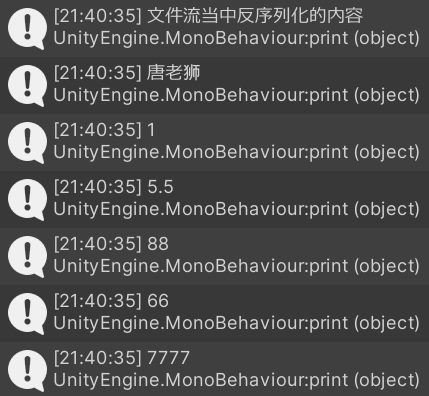
using (FileStream fs = File.OpenRead(Application.persistentDataPath + "/TestMsg.Tang"))
{
print("文件流当中反序列化的内容");
TestMsg msg2 = TestMsg.Parser.ParseFrom(fs);
print(msg2.TestMap[1]);
print(msg2.ListInt[0]);
print(msg2.TestD);
print(msg2.TestMsg2.TestInt32);
print(msg2.TestMsg3.TestInt32);
print(msg2.TestHeart.Time);
}
}
}
|
从字节数组反序列化
主要使用
- 生成的类中的
Parser.ParseFrom 方法
- 内存流
MemoryStream 对象
从字节数组反序列化很简单,将要反序列化的字节数组传入到内存流的构造方法内,再将内存流传入到 Parser.ParseFrom() 方法内即可
1
2
3
4
5
6
7
8
9
10
11
12
13
14
15
16
17
18
19
20
21
22
23
24
25
26
27
28
29
30
31
32
33
34
35
36
37
38
39
40
41
42
43
| using GamePlayerTest;
using Google.Protobuf;
using System.IO;
using UnityEngine;
public class Lesson41 : MonoBehaviour
{
void Start()
{
TestMsg msg = new TestMsg();
msg.ListInt.Add(1);
msg.TestBool = false;
msg.TestD = 5.5;
msg.TestMap.Add(1, "唐老狮");
msg.TestMsg2 = new TestMsg2();
msg.TestMsg2.TestInt32 = 88;
msg.TestMsg3 = new TestMsg.Types.TestMsg3();
msg.TestMsg3.TestInt32 = 66;
msg.TestHeart = new GameSystemTest.HeartMsg();
msg.TestHeart.Time = 7777;
byte[] bytes = null;
using (MemoryStream memoryStream = new MemoryStream())
{
msg.WriteTo(memoryStream);
bytes = memoryStream.ToArray();
print("字节数组长度:" + bytes.Length);
}
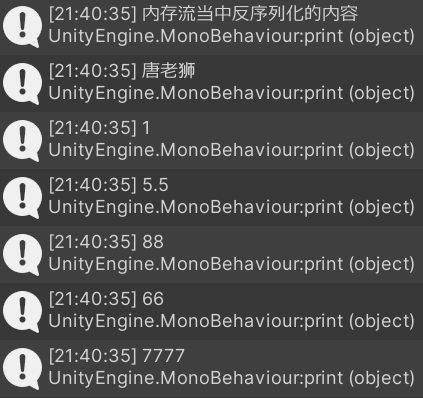
using (MemoryStream memoryStream = new MemoryStream(bytes))
{
print("内存流当中反序列化的内容");
TestMsg msg2 = TestMsg.Parser.ParseFrom(memoryStream);
print(msg2.TestMap[1]);
print(msg2.ListInt[0]);
print(msg2.TestD);
print(msg2.TestMsg2.TestInt32);
print(msg2.TestMsg3.TestInt32);
print(msg2.TestHeart.Time);
}
}
}
|
更方便的从字节数组反序列化
在 MessageParser<> 内同样有更方便的从字节数组中直接反序列化的方法
1
2
3
| TestMsg msg = new TestMsg();
byte[] bytes = msg.ToByteArray();
TestMsg msg2 = TestMsg.Parser.ParseFrom(bytes);
|
由于声明 ParseFrom() 的 MessageParser<> 在 Protobuf 生成的消息类里是静态属性,
因此我们可以通过反射方便的获取该静态属性,进而通过该静态属性反射出 ParseFrom 方法,在通过反射出的消息调用执行该方法
1
2
3
4
5
6
7
8
9
10
11
12
13
14
15
|
public static T GetProtoMsg<T>(byte[] bytes) where T : class, IMessage
{
Type type = typeof(T);
PropertyInfo pInfo = type.GetProperty("Parser");
object parserObj = pInfo.GetValue(null, null);
Type parserType = parserObj.GetType();
MethodInfo mInfo = parserType.GetMethod("ParseFrom", new Type[] { typeof(byte[]) });
object msg = mInfo.Invoke(parserObj, new object[] { bytes });
return msg as T;
}
|