UN1L9-2——序列化和反序列化
UN1L9-2——序列化和反序列化
对于各类型数据和字节数据相互转换相关API,已在BitConverter讲过,这里一笔带过
序列化类对象
非字符串类型转字节数组
字节数组的长度,由该方法输入的数据类型决定,例如
int就是4个字节,这个数组的长度就是4,存储了4个字节
这个方法可以转换大部分的基本数据类型,除了decimal和string,decimal我们几乎不用,而string我们使用Encoding类来转换
将字节数组转换为各种类型时,根据类型的不同,方法名是不同的,但是方法名的规律很简单,基本就是
To + 类型或者To + Int + 位数
第一个参数填入要转换的字节数组,第二个参数填入要从数组第几个开始读取(默认为0)
2
print(i);
字符串类型转字节数组
字符串 转换为 指定编码格式的字节数组 需要我们
Encoding.编码格式.GetBytes(),一般在游戏开发中我们都使用UTF-8这个编码格式
将一个类对象转换为二进制
我们对类对象的2进制序列化主要用到的知识点是
-
BitConverter转换非字符串的类型的变量为字节数组 -
Encoding.UTF8转换字符串类型的变量为字节数组注意:为了考虑反序列化,我们在转存2进制,序列化字符串之前,先序列化字符串字节数组的长度
转换流程是:
- 明确字节数组的容量
- 申明一个装载信息的字节数组容器
- 将对象中的所有信息转为字节数组并放入该容器当中(利用数组中的CopeTo方法转存字节数组)
注意:网络通信中我们不能直接使用数据持久化2进制知识点中的BinaryFormatter2进制格式化类
因为客户端和服务器使用的语言可能不一样,BinaryFormatter是C#的序列化规则,和其它语言之间的兼容性不好
如果使用它,那么其它语言开发的服务器无法对其进行反序列化,我们需要自己来处理将类对象数据序列化为字节数组
假设我们要序列化下面这个类的数据:
1 | public class PlayerInfo |
单纯的转换一个变量为字节数组非常的简单,但是我们如何将一个类对象携带的所有信息放入到一个字节数组中呢
我们需要做以下几步:
-
明确字节数组的容量(注意:在确定字符串字节长度时要考虑解析时如何处理)
1
2
3
4
5
6
7//得到的 这个Info数据,如果转换成字节数组,那么字节数组容器需要的容量为:
int indexNum = sizeof(int) + //lev int类型 4
sizeof(int) + //name字符串转换成字节数组后,数组的长度 4
Encoding.UTF8.GetBytes(info.name).Length + //字符串具体字符数组的长度
sizeof(short) + //atk short类型 2
sizeof(bool); //sex bool类型 1 -
申明一个装载信息的字节数组容器
1
2byte[] playerBytes = new byte[indexNum];
int index = 0; //从playerBytes在数组中的第几个位置去存储数据 -
将对象中的所有信息转为字节数组并放入该容器当中(可以利用数组中的
CopeTo方法转存字节数组)
CopyTo方法的第二个参数代表 从容器的第几个位置开始存储1
2
3
4
5
6
7
8
9
10
11
12
13
14
15
16//等级
BitConverter.GetBytes(info.lev).CopyTo(playerBytes, index);
index += sizeof(int);
//名字
byte[] strBytes = Encoding.UTF8.GetBytes(info.name); //字符串转换为字节数组
int num = strBytes.Length; //获取字符串字节数组长度
BitConverter.GetBytes(num).CopyTo(playerBytes, index); //将字符串字节数组长度消息写入到该类对象的字节数组内
index += sizeof(int); //索引后移
strBytes.CopyTo(playerBytes, index); //将字符串字节数组写入到该类对象的字节数组内
index += num; //索引后移
//攻击力
BitConverter.GetBytes(info.atk).CopyTo(playerBytes, index);
index += sizeof(short);
//性别
BitConverter.GetBytes(info.sex).CopyTo(playerBytes, index);
index += sizeof(bool);
反序列化类对象
我们对类对象的2进制反序列化主要用到的知识点是
-
BitConverter转换字节数组为非字符串的类型的变量 -
Encoding.UTF8转换字节数组为字符串类型的变量(注意:先读长度,再读字符串)
转换流程是:
- 获取到对应的字节数组
- 将字节数组按照序列化时的顺序进行反序列化(将对应字节分组转换为对应类型变量)
字节数组转非字符串类型
将字节数组转换为各种类型时,根据类型的不同,方法名是不同的,但是方法名的规律很简单,基本就是
To + 类型或者To + Int + 位数
第一个参数填入要转换的字节数组,第二个参数填入要从数组第几个开始读取(默认为0)
2
3
int i = BitConverter.ToInt32(bytes, 0);
print(i);
字符串类型转字节数组
字节数组 依据指定编码格式转换为 字符串 需要我们
Encoding.编码格式.GetString(),一般在游戏开发中我们都使用UTF-8这个编码格式
第一个参数填入要转换的字节数组,第二个参数填入要从数组第几个开始读取(默认0),第三个参数填入要读取几个字节(默认全部读取)
2
3
string s = Encoding.UTF8.GetString(strBytes, 0, strBytes.Length);
print(s);
将二进制数据转为一个类对象
假设要对下面的对象进行反序列化
1 | public class PlayerInfo |
-
获取到对应的字节数组
1
2
3
4
5
6
7PlayerInfo info = new PlayerInfo();
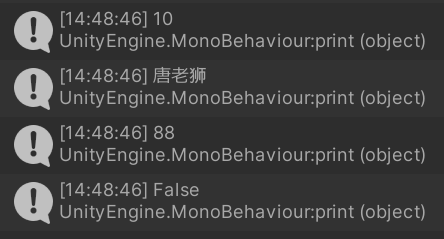
info.lev = 10;
info.name = "唐老狮";
info.atk = 88;
info.sex = false;
byte[] playerBytes = info.GetBytes(); -
将字节数组按照序列化时的顺序进行反序列化(将对应字节分组转换为对应类型变量)
1
2
3
4
5
6
7
8
9
10
11
12
13
14
15
16
17
18
19
20
21PlayerInfo info2 = new PlayerInfo();
//等级
int index = 0;
info2.lev = BitConverter.ToInt32(playerBytes, index);
index += 4;
print(info2.lev);
//姓名的长度
int length = BitConverter.ToInt32(playerBytes, index);
index += 4;
//姓名字符串
info2.name = Encoding.UTF8.GetString(playerBytes, index, length);
index += length;
print(info2.name);
//攻击力
info2.atk = BitConverter.ToInt16(playerBytes, index);
index += 2;
print(info2.atk);
//性别
info2.sex = BitConverter.ToBoolean(playerBytes, index);
index += 1;
print(info2.sex);